
Mastering GTD: Boost Your Productivity with the Power of Organized Lists
Discover how David Allen’s GTD method transforms simple lists into a powerful productivity system that reduces stress, improves focus, and keeps your tasks under control.
In a world overflowing with responsibilities, deadlines, and constant digital noise, staying organized can feel like a never-ending battle. Yet the simplest tool—a list—remains one of the most powerful ways to bring order to the chaos. Lists help structure our thoughts, prioritize work, and maintain control of daily tasks. In many ways, life itself is one big list—broken into categories, commitments, and next actions.
David Allen’s groundbreaking book “Getting Things Done (GTD)” reshaped how millions approach productivity. Instead of relying on memory, scattered notes, or reactive habits, GTD offers a streamlined system that puts clarity and confidence at the center of your workflow—whether you're using a physical notebook or modern task-management software.
The Core Principles of GTD
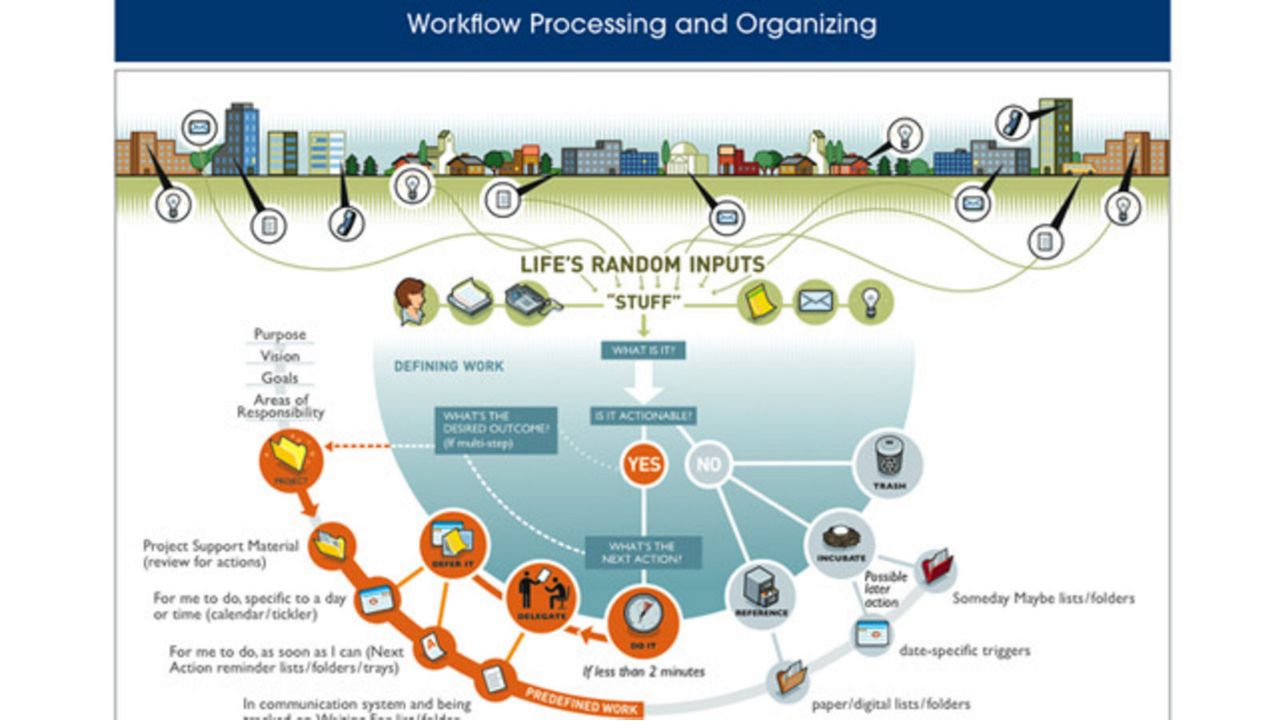
At the heart of GTD lies the concept of the inbox: a single trusted place where every idea, task, reminder, and commitment is captured. Whether your inbox lives inside your email, a digital task app, or a handwritten journal, its purpose is the same—collect everything, so your mind doesn’t have to.
1. Capture Everything
Your tasks originate from everywhere: conversations, emails, your calendar, sudden ideas, or ongoing projects. GTD teaches you to capture all of it immediately, without judgment, so nothing slips through the cracks.
2. Clarify & Organize
Once items are captured, each one should be evaluated. Is it actionable? Does it belong in a project? Should it be delegated, scheduled, or discarded?
3. Delegate When Possible
Not all tasks belong to you. If someone else can complete a task, delegate it and place it into a Waiting For queue—a core GTD concept that ensures follow-up without mental strain.
4. The Two-Minute Rule
If a task can be completed in two minutes or less, do it right away. These micro-tasks create momentum, build confidence, and keep your list clutter-free.
5. Schedule Intentionally
Longer tasks need planning. Assign deadlines and estimate time requirements. Your future self will thank you when your calendar proactively reminds you what needs attention and when.
6. Review Regularly
The weekly review—one of GTD’s most powerful habits—keeps your system fresh, accurate, and aligned with your priorities.
Top GTD-Friendly Apps and Tools
Whether you prefer minimal tools or full-featured software suites, modern apps make implementing GTD easier than ever.
Best Desktop Apps
- Todoist: Clean, fast, and powerful—perfect for GTD projects, priorities, and recurring tasks.
- OmniFocus: A GTD powerhouse for Mac users with deep project structure and custom perspectives.
- Microsoft Outlook: Great for those who want GTD integrated with email and calendar tools.
- Evernote: A flexible capture and organizational tool with excellent tagging and notebook systems.
Top Mobile Apps
- Todoist (iOS/Android): Syncs flawlessly across devices and supports natural-language task entry.
- OmniFocus (iOS): A seamless extension of the desktop version for Apple users.
- Things (iOS): Beautifully designed and ideal for structured planning.
- Notion: Highly customizable—perfect for building your own GTD workspace.
- TickTick: Offers reminders, a built-in Pomodoro timer, and a fast, intuitive interface.
GTD is more than a productivity method—it’s a lifestyle shift. By removing the mental clutter and creating a trusted system outside your brain, you free up energy for deep work, creativity, and meaningful progress.
For a deeper dive, consider reading David Allen’s “Getting Things Done.” It’s a transformative approach that can dramatically improve your clarity and efficiency.
Have questions or want help structuring your own GTD system? Reach out anytime—we love optimizing workflows and helping people reclaim time and focus.
Tags